Blog Post #4
AWD
Author: Tom Frye
Updated: 04-13-2026
Windows 10 & 11
Windows In General
Windows is the most popular desktop operating system in the world today. And even making that statement violates the rules of grammar by using a noun that is decidedly singular but spelled in plural form. But the fact remains that well over half of all desktop and laptop computer users are running Windows.

The world's most popular desktop computer operating system (OS) is also the world's least intuitive. Microsoft seems to never ask their userbase how they can design their user interface (UI) better with ease-of-use as their highest priority. Always with Microsoft, the focus is on creating a complex design that users will need to learn how to use, rather than adding simplicity to their products from the very start. This problem for users has never improved. And if anything, it has only gotten worse with each new version of Windows that is released. And Windows 11 is the pinnacle poster child of Microsoft's misguided and failed UI design philosophy. And to make matters worse, Windows is now the only popular desktop operating system that is not based on a Unix-like kernel, and that fact could ultimately lead to its downfall.

Say what you want about Apple and macOS, but their operating system's user interface does not change radically with every new version. Microsoft Windows has always been the antithesis of that practice. And each new version of Windows has created new challenges and a steeper learning curve for even their most loyal Windows users with each and every new release. It is almost as if Microsoft makes a profit from each copy of the Windows for Dummies book that is sold. It's as if each one of us wants to be called a dummy and needs to read an 800-page book just to use our computer operating system.
This lack of logic and intuitive interfaces started to accelerate with Windows 8, and has only gotten worse with Windows 10, and now Windows 11. Despite increasing backlash from complaining consumers, no changes in their design philosophies are ever forthcoming. On the other hand, Mac users are simply astonished at the level of pain Windows users must endure just to do simple tasks with the Windows operating system and file manager. Mac users find themselves happily using their new versions of macOS pretty much right out-of-the-box. But since Windows is #1 in popularity, especially in the large corporate enterprise marketplace, Microsoft feels no pressure to change the way they do business. The troubles of individual Windows Home users doesn't bother them because they make a lot more money from corporate Windows users.
After installing the latest version of Linux Mint on an old laptop, we were shocked to find that there were very few nuances to learn before jumping in. And we started using the Linux Mint Cinnamon OS productively within mere minutes of booting it up for the very first time. After starting up our first Windows 11 computer, we spent about a week tweaking it until it was actually usable because so much of the OS has radically changed between Windows 10 and Windows 11.
Windows 10
If your old Windows 10 computer is working just fine, then you may not see a need to upgrade to Windows 11. However, Microsoft has imposed a reason why you must upgrade to Windows 11. And that reason is because they have announced the End of Support for Windows 10, and that support ended abruptly on October 14, 2025. But that may not bother you if you are one of those people who hates to run Windows Updates every month, even though we strongly recommend that you always keep your Windows operating system up-to-date.
Extended Support
However, this isn't the end of the world. You can still buy yourself another year of Windows 10 support with Windows 10 Consumer Extended Support Updates (ESU) offered by Microsoft. In most cases, you can get this offer for free. And this ESU will help you keep your computer supported with updates until October 13, 2026, and give you enough time to decide what you want to do next.
So what are your options at that point? Although we don't recommend it, you could continue to use your Windows 10 computer without updates. But that is the riskiest option of all, because a vulnerability in Windows 10 could be discovered and then exploited by malicious hackers. And if that happens, your computer could become compromised and actually stop booting up altogether. Then, all of your precious data could be lost, making this the absolutely worst possible scenario and outcome.
PC Health Check
To find out quickly if you can install Windows 11 on your old Windows 10 computer, you can download, install, and run the PC Health Check App that is available here.
Upgrading To Windows 11
Microsoft's pressure and scare tactics appear to be working. According to StatCounter, Windows 11 is rapidly becoming the most prevalent Windows OS in the world today.
If your Windows 10 computer was purchased within the last few years, it is entirely possible that your current Windows 10 computer could upgrade to Windows 11. And if your system could be upgraded, it will still cost you the price of the Windows 11 Home operating system, which is currently priced at $139 USD if you buy it directly from Microsoft. But that is still far less expensive than buying a brand new Windows 11 computer. Microsoft has Windows 11 Pro priced at $199 USD, but we don't think you need the Pro version. It actually doesn't offer you any advantages over the Home version, in our opinion.
Other Options
There are few other options to upgrade that we would not recommend. For instance, some people are able to find an OEM (Original Equipment Manufacturer) version of Windows 11 offered through an outside vendor. These OEM packages usually have a much lower price tag than the official versions of Windows 11 that are sold officially and directly through Microsoft. The intended marketplace for OEM Windows 11 versions is to companies who manufacture computers. OEMs can preinstall registered versions of the OS for their customers, who can then use their new computers right out-of-the-box. But we've gotten mixed reviews from folks who have purchased OEM versions through online vendors. Some offers were bargain-priced and came with valid product keys and installed perfectly fine. Others were scams to get your money, leaving you with a version of Windows 11 that has an invalid product key because it was previously used. And if that OEM vendor is in another country, you may have little or no recourse to get your money back.
We've also heard that you can find hacks online that will show you how to install Windows 11 on computers that do not meet the current hardware requirements. We found one YouTube video that made this claim and had detailed instructions on how to accomplish this task. But for whatever reason, YouTube took the video down the very next day.
Lastly, it is also possible to install Windows 11 without a valid product key if your computer hardware meets the current requirements. Yes, you can download it and install it for free directly from Microsoft. This website also includes all of the instructions necessary to perform this task, but a valid product key is not provided. Therefore, during the installation process, you will be asked to enter your product key, which is a task that you can choose to skip. Then Windows 11 will continue to install in an unactivated state, but you will still be able to use Windows 11 in its unactivated and restricted state. For instance, your desktop will always display a watermark that says Activate Windows. And you will not be able to change or personalize the desktop wallpaper or themes. And you will be violating Microsoft's Windows 11 licensing laws. But we've never heard of anyone getting into any legal trouble over this. We assume that this becomes a standard practice in foreign countries where people are impoverished and simply cannot afford the extra expense. But once again, this is not a process that we recommend. If you want to become a professional web developer, we believe you should always prefer to use legal versions of all software products, especially your computer's operating system.
Just Do It
The last option available is of course to simply bite the bullet and buy a brand new Windows 11 computer. You've had enough time to save up for this expense, and you've known this day was coming. So now it is time to take the plunge and buy that brand new Windows 11 computer that you've always wanted.
Your Old Computer
But what do you do with your old Windows 10 computer in the event that it is not upgradable to Windows 11? Since your Windows 10 computer is otherwise working perfectly fine right now, you might want to consider installing some version of the Linux operating system on it. The Linux OS does not suffer from the security vulnerabilities that the Windows OS has. And there are Linux distros that are specifically designed to be beginner-friendly as well.
We strongly recommend Linux Mint Cinnamon as an alternative to Windows. It works just fine. It has a very intuitive UI. It is 100% free to download and install. And it will run many times faster than Windows 10 on the same computer. Of course, you will have to do some homework to learn how to perform this operation, and that is beyond the scope of this particular blog post. But perhaps we will cover that process in some future blog post.
Windows 11
Let's just assume that you have cleared all of the above hurdles. You have now either purchased a brand new Windows 11 computer, or you were able to install Windows 11 on your old Windows 10 computer. Now your OOBE begins. And just FYI, OOBE is a fancy technological acronym for out-of-box experience, while FTUE stands for first-time user experience.
Your OOBE
Setting up your Windows 11 computer is a fairly straightforward process if you've owned and registered a recent version of Windows in the past. There is a series of menus that you must navigate through in order to input your username and password, establish a Windows Hello PIN, enter your WiFi name (SSID) and password, and a few other items like selecting the correct time zone. Windows 11 will also run Windows Update to make sure that your version is fairly up-to-date and that all of the correct hardware drivers are installed. Windows typically restarts several times after Windows Update finishes, and then your FTUE begins.
Your FTUE
The Windows 11 GUI (Graphics User Interface) might looks different than what you were used to in Windows 10. For one thing, the icons are now in the center of the Taskbar by default, much like the Dock on a Mac, but you can easily changed this. And the Start Menu looks a little different as well. We've always struggled with the fact that Microsoft has one menu for Programs and another menu for Apps. Most of us seem to use the two terms interchangeably, but Microsoft installs Programs using the legacy method, and uses another way to install Apps that is very similar to the way applications are installed on a phone. And if you click on This PC, you will get a window that displays a few familiar folders like Documents, Downloads, Pictures, Music, and Videos.
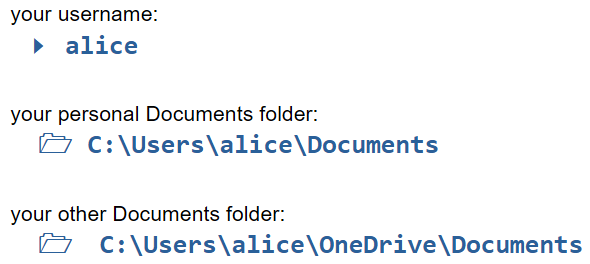
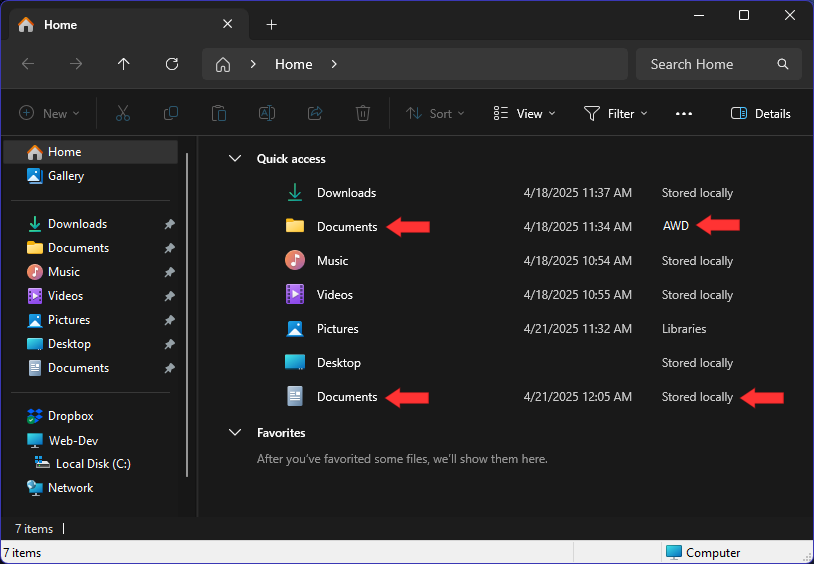
But nobody told you that there are now two Documents folders. There is one for your own personal data, and there is another one that is hidden away inside your OneDrive folder. We discovered this by accident after scanning a document and then saving it to Documents and wondering why it wasn't in the Documents folder where we usually saved our Documents. Please be aware of this issue so that it doesn't happen to you. In fact, you might want to pin it as illustrated below so that you can actually find that folder again when you need to find it. Both folders are pointed out using red arrows.
And if all of these issues weren't enough to contend with, OneDrive might be busy backing up all of your data slowly but continuously to the cloud, even through you don't really have any new data for it to backup, because you haven't even attempted to restore data backed up from your old Windows 10 computer yet. OneDrive is not really a fast or inexpensive data backup solution. Microsoft only gives you 5 GB of cloud storage on OneDrive for free. If you have any real data at all to backup, you will quickly run out of space, and Microsoft will notify you that you must start paying a monthly fee to increase your storage space. We recommend deleting the app entirely, and installing Dropbox Plus in its place, but that is certainly a personal choice. We will document all of your possible Cloud Storage options below in this blog post.
And lastly, we need to mention that Microsoft is now pushing Copilot on us much more aggressively than ever before. That's another app that is easily uninstalled, even though Microsoft will most likely reinstall it again the very next time you run Windows Update. Welcome to Windows 11.
Main Purpose
The main purpose of this website is to help teach front-end web development to those who are relatively new to writing computer programming code. Our main purpose is not to teach users how to use their operating systems. However, the most recent changes in the Windows 11 OS, and the introduction of AI that is now pervasive in almost everything we touch these days, necessitates extra help and guidance. And that is why this blog post exists.
In the first draft of this blog, we had a long list of everything we found in Windows 11 that was questionable and we offered solutions to each issue in hopes of expediting productivity for each new user. However, in this second draft, we are going to assume that each user is savvy enough to configure his or her own Windows 11 computer without our help. Nevertheless, it seems imperative to recommend some third-party apps that you can download and install to fix all of the problems found in the Windows 11 operating system and its native apps. If you do that, then your computer will become much more user-friendly, and that will increase your productivity and your ability to learn.
Bloatware
Not all third-party apps are good. Some personal computer manufacturers add more third-party applications on top of the already overbloated Windows 11 OS and its own native apps. These programs are called bloatware. Most of these are trial versions of software products that allow you to use them for a trial period, hoping that you will pay for these products when the trial period ends. PC manufacurers get paid by the makers of these software apps to include them with each and every PC that they sell. However, the good news is that they can all be uninstalled. If you try one of these programs and decide that you like it, then by all means pay money and keep using it. On the other hand, you may decide to uninstall any piece of bloatware before even trying it. And we apologize for the unscrupulous nature of PC manufacturers who push bloatware products on us.
Windows 11 Native Apps
And of course, not all Windows 11 native apps are bad either. Some of the applets included with the Windows 11 OS are actually quite handy and useful. For instance, the calculator is an app that many of us use almost daily, and there are others as well. But Microsoft has a bad habit of including their own underpowered native apps as the default apps that we must use until we realize that there are better applications out there that are available, and that are often completely free for us to download, install, and set as the new default apps. So next, we will introduce you to some of our own favorite third-party apps and why we believe they are vastly superior as replacements for some of these Windows 11 native apps that we will identify by name.